
The Documentation Dilemma
You have a complex microservices system. Your product manager needs to see the business logic. Your backend engineer needs to verify the API sequence. Your platform architect needs a reliable architecture diagram to map the service topology.
So you open Lucidchart for the cloud architecture diagram. You write Mermaid code for the sequence diagram. You sketch a BPMN flow for the business process.
Three tools. Three sources. Three versions of the truth—and by next sprint, all three are wrong.
This is the silent killer of modern software architecture: documentation drift. Every time you refactor a service, rename an endpoint, or split a database, your system design diagrams diverge from reality. The cost isn't just outdated files—it's the cognitive tax on every engineer who has to hold three mental models of the same system.
The AI era compounds this problem. LLMs can generate code in seconds, but they need structured context to generate understanding. They need a pattern.
Introducing the Three-View Pattern
FlowZap now supports three views generated from a single source of truth: One .fz file, three perspectives, zero drift.
| View | Diagram Type | Audience | Answers |
|---|---|---|---|
| Workflow | Business Process / Flow | Product Managers, Analysts | "What happens when payment fails?" |
| Sequence | UML Sequence Diagram | Developers, QA Engineers | "In what order do services talk?" |
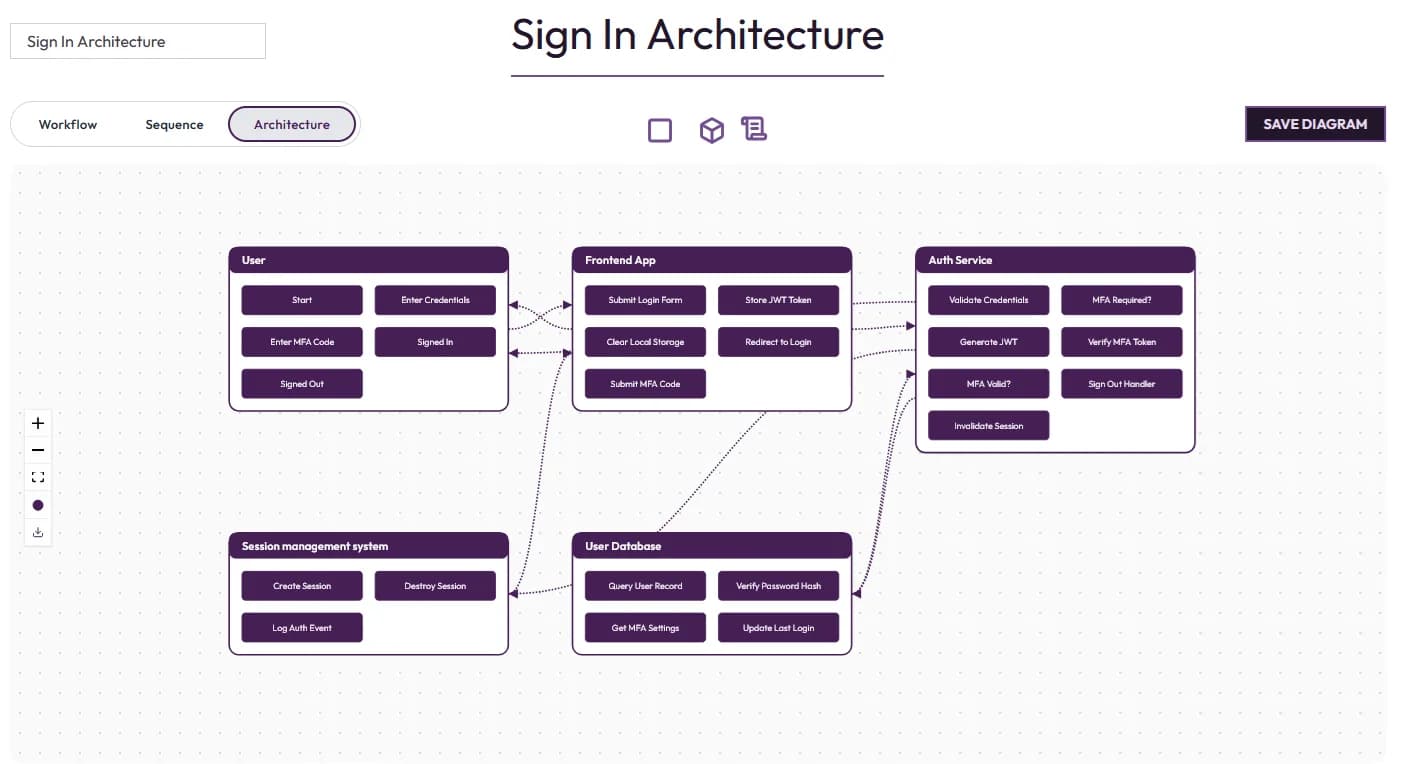
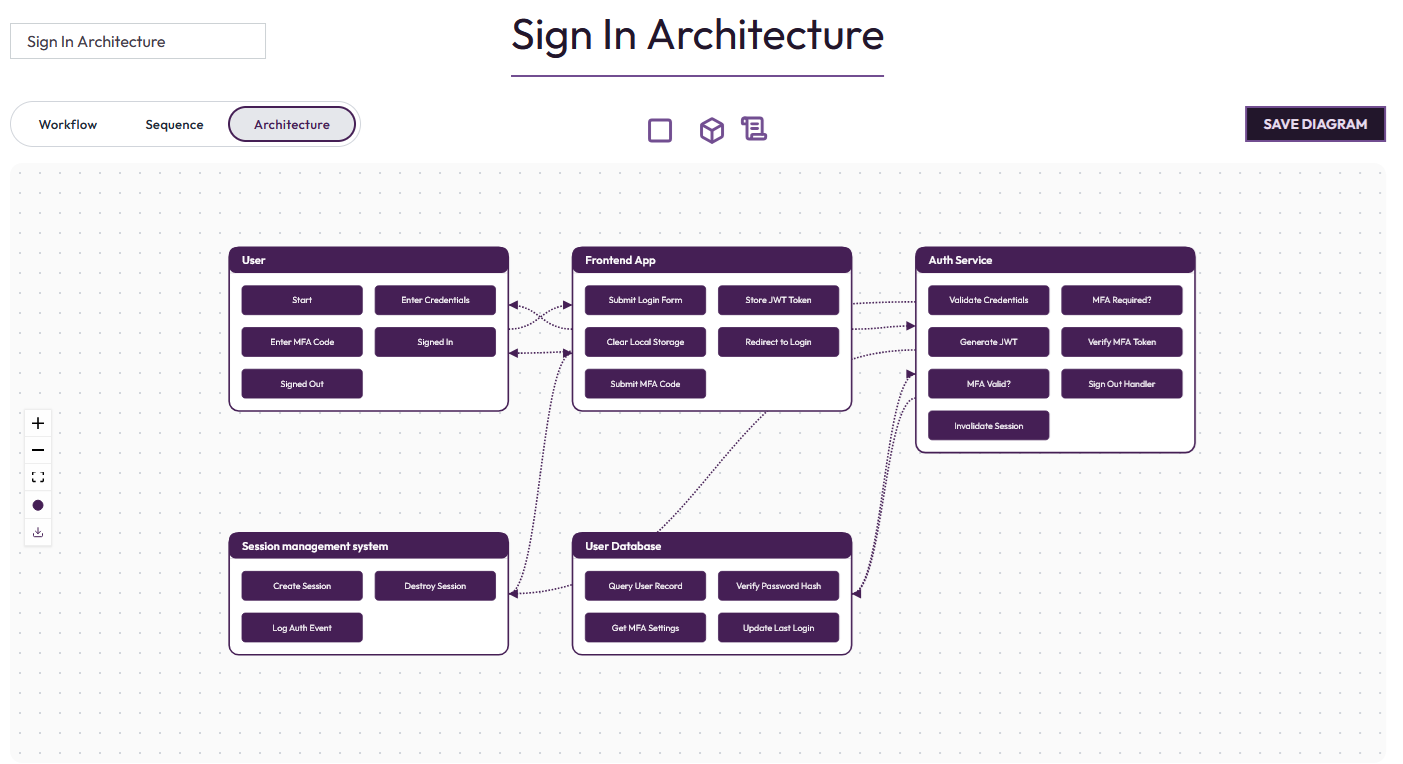
| Architecture | Component Architecture Diagram | Architects, Platform Engineers | "What depends on what?" |
Each view is a lens on the same underlying system. Change the .fz code, and your microservices architecture diagram updates instantly alongside your sequence and workflow views. No more copy-paste. No more "I'll update the architecture diagram later."
Why Patterns Matter
The history of software engineering is the history of patterns that tame complexity.
MVC organized web applications. Microservices organized deployment. The C4 model attempted to organize architecture diagrams. Each pattern gave engineers a shared vocabulary.
The Three-View Pattern is the missing design system for the AI era.
It gives teams a standard way to model systems that serves three distinct audiences—business, implementation, and infrastructure—without forking the source of truth. And it gives LLMs a predictable schema for generating system architecture diagrams that humans actually trust.
When an AI assistant can generate a .fz file and instantly render a complete software architecture diagram, documentation stops being a chore and becomes a side effect of building.
The MCP Integration: AI-Native Documentation
From Vibe Coding to Production Architecture
Here is where it gets interesting. What am I saying: Sooooooo useful.
FlowZap's MCP Server now exposes all three views directly to AI IDEs like Cursor, Claude Code, Windsurf, just to name a few.
You ask your AI Assistant, "use Flowzap to generate an Architecture Diagram to present the Microservices structure of the App.": Your AI assistant generates the .fz code and returns the FlowZap link to the rendered architecture diagram—showing components, services, databases, and external APIs—right in your editor. Switch to "view": "sequence" to display the timing. Switch to "view": "workflow" to show the product manager the business logic.
One code. Three views. Zero context switching.
This is what infrastructure-as-code documentation looks like: not static files, not diagrams you paste into Confluence and forget, but living, queryable views that update as your system evolves. The LLM does not just generate code—it generates architectural understanding.
Another example? You are shipping a new checkout flow. In Cursor, you prompt: "Generate a FlowZap for a checkout system with fraud check, payment processing, and inventory reservation."
The AI produces the .fz code. You hit enter. Three tabs open:
- Workflow View — You see the fraud decision branch, the retry logic, the happy path vs. failure path.
- Sequence View — You see the exact API calls:
POST /fraud-check→POST /payment/charge→PUT /inventory/reserve. - Architecture View — You see the generated architecture diagram: the Checkout Service, Fraud Engine, Payment Gateway, and Inventory DB. You notice the Inventory Service is a single point of failure. You refactor now, not after the incident.
One code change propagates to all three views. The product manager, the backend engineer, and the architect all look at the same truth through different lenses, all at AI speed.
Architecture Topics the Three-View Pattern Illuminates
The Architecture View is not just a diagram—it is a lens for understanding the structural forces in your system. Whether you are designing a microservices architecture, mapping event-driven systems, or modeling cloud infrastructure, the Architecture View reveals the topology that Sequence and Workflow views obscure.
Key Architecture Patterns Visualized in Seconds
| Topic | What the Architecture Diagram Reveals | Critical Decisions |
|---|---|---|
| Microservices Architecture | Service boundaries, API gateways, service discovery | Which services to merge vs. split |
| Event-Driven Architecture | Event brokers (Kafka, SQS), producers, consumers, event schemas | Synchronous vs. async coupling |
| CQRS (Command Query Responsibility Segregation) | Read models vs. write models, data synchronization paths | Consistency trade-offs |
| Serverless Cloud Architecture | Function boundaries, cold start risks, managed service dependencies | Cost vs. latency optimization |
| Saga Pattern | Distributed transaction coordinators, compensating actions | Failure recovery workflows |
| Circuit Breaker & Bulkhead | Resilience boundaries, failure isolation zones | Blast radius containment |
Architecture as a Conversation
The Architecture View transforms abstract system design into a concrete architecture diagram that teams can discuss. When a senior engineer asks "What happens if the Inventory DB goes down?"—you do not point to a text document. You point to the topology. The diagram makes the dependency visible, debatable, and fixable.
This is the power of the Three-View Pattern: the same .fz code that generates your UML sequence diagram for API contracts simultaneously generates your C4 model-style component view for architectural review. Business logic, interaction timing, and structural topology—unified.
The Future is One Code, Three Views
The Three-View Pattern is not just a feature—it is a standard for how software architecture should be documented in the AI era.
Stop maintaining three diagrams. Stop explaining the same system three different ways. Stop letting your architecture diagrams drift the moment you deploy.
Write the .fz file once. Let FlowZap handle the rest.
Try it now!
- Open the FlowZap editor and generate your first architecture diagram
- Install the MCP Server for AI-native diagram generation