
The Architecture of Agency
The transition from traditional Interface Design to Agentic User Experience (Agentic UX) represents a fundamental shift in software architecture. We are moving from designing explicit interaction flows—where users click buttons to perform tasks—to designing intent-driven systems, where users delegate goals to AI agents that coordinate execution behind the scenes.
However, for many Business Analysts and Solopreneurs, "Agentic UX" remains an abstract concept. We hear about "orchestration layers" and "autonomous swarms," but rarely see a concrete visualization of how these components interact with the user.
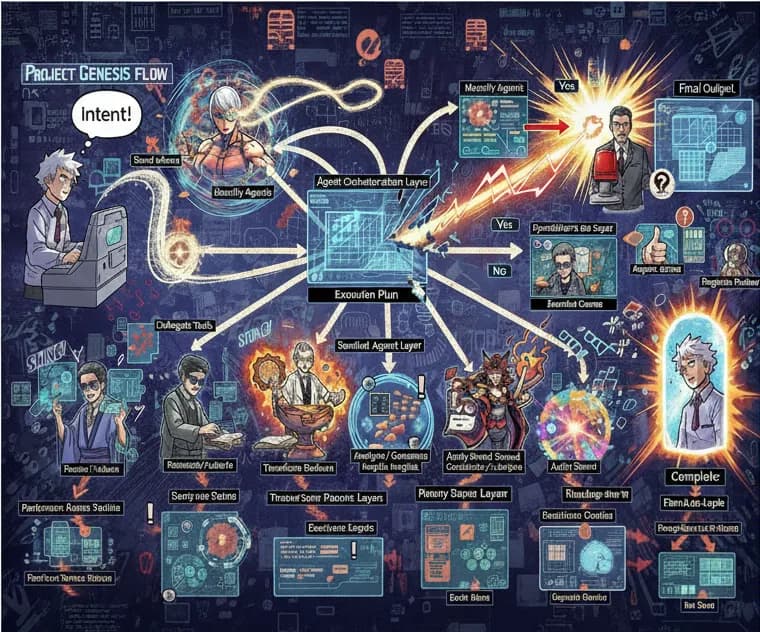
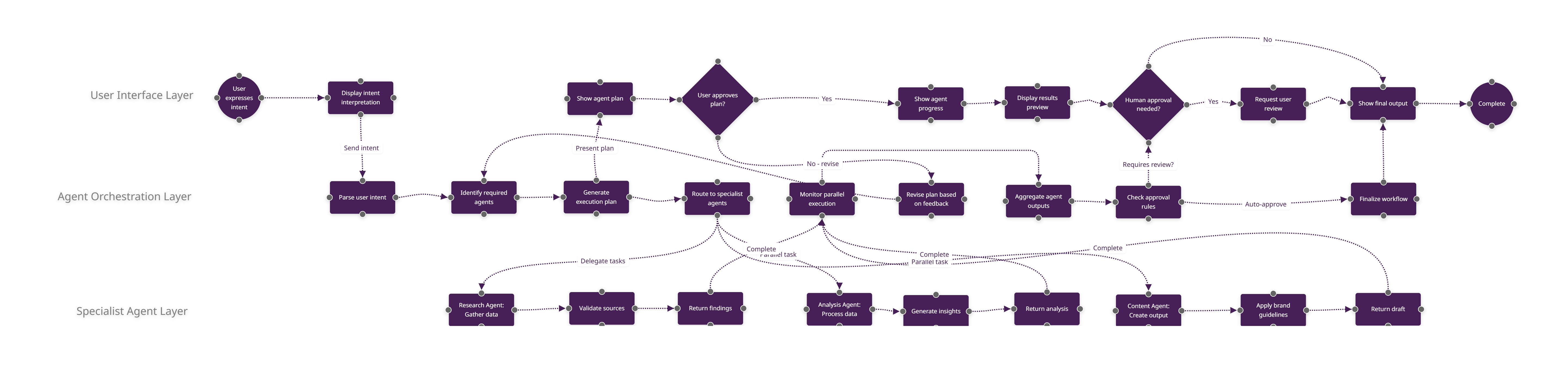
But how can you build a reliable system if you cannot visualize it first? The diagram below represents a reference architecture for Agentic UX—a reusable three-layer pattern that turns the complex theory of multi-agent systems into a structured, designable workflow.
Traditional UX design focuses on screens. Agentic UX focuses on the workflow of delegation. To design this effectively, we must decouple the user's visibility from the agent's execution.
Our reference model separates the experience into three distinct layers:
1. The User Interface Layer (Visibility & Trust)
The top lane of the diagram represents the "contract" between the human and the AI.
- Intent Expression: The user provides a high-level goal (e.g., "Onboard this new client").
- Plan Preview: Before acting, the system mirrors the intent back to the user, establishing alignment.
- Visibility: As agents work, the UI provides real-time state updates, replacing the "black box" anxiety with transparent progress logs.
- Approval Gates: Critical decision points where the system pauses for explicit human authorization.
2. The Orchestration Layer (Logic & Control)
The middle lane is the system's "executive function." It does not perform the task; it manages the resources that do.
- Intent Parsing: Converting natural language into structured commands.
- Routing: determining which specialist tools are required.
- Parallelization: Spinning up concurrent workstreams to reduce latency.
- Governance: Enforcing business rules (e.g., "Any refund over $50 requires manager approval").
3. The Specialist Layer (Execution)
The bottom lanes represent vertical competence. These are the domain-specific agents—Payment Agents, Document Agents, Communication Agents—that interact with APIs like Stripe, Google Drive, or Slack. By isolating these agents, the system becomes modular; you can upgrade your "Email Agent" without breaking the entire orchestration flow.
Case Study: The "Invoice Chaser" Workflow
To demonstrate this architecture in practice, let us examine a common Solopreneur use case: Automated Accounts Receivable.
Instead of viewing this as a simple automation script, we design it as an Agentic Experience:
- Intent (UI Layer): The user signals a desire to "Recover overdue invoices older than 7 days."
- Orchestration: The Orchestrator analyzes the request, queries the accounting database, and identifies three non-paying clients. It generates a recovery plan involving a draft email and a text message.
- Specialist Execution:
- The Finance Agent pulls the exact amounts and invoice PDFs.
- The Comms Agent drafts a polite-but-firm reminder in the founder's voice.
- The Human-in-the-Loop: The system pauses. It presents the drafts to the user in the UI Layer: "I have prepared reminders for Clients A, B, and C. Approve to send?"
- Completion: Upon approval, the agents execute, and the UI logs the activity.
This same architectural pattern applies seamlessly to Client Onboarding (CRM + Docs + Slack) or Support Resolution (Ticket Analysis + Refunds + Email).
Why Diagramming Precedes Coding
The complexity of multi-agent systems lies in the handoffs. If you jump straight to building in n8n, LangChain, or Make.com, you risk creating brittle automations where the logic is buried in code.
By using FlowZap to define the sequence diagram first, you achieve three critical outcomes:
- Alignment: Stakeholders can see exactly where the human is looped in.
- Specification: The diagram serves as the blueprint for implementation.
- Portability: A clear logic flow can be exported to any automation platform.
Get Started
We have codified this three-layer architecture into a reusable Agentic UX Template, available now for FlowZap users. It includes the complete logic for the User, Orchestrator, and Specialist layers, pre-wired for common Solopreneur scenarios.
Download the Agentic UX Template
Stop guessing at how agents should behave. Design the workflow, define the boundaries, and build with confidence.
Inspirations
- Salesforce: UX Shift to Agentic Design
- From Products to Systems: The Agentic AI Shift
- The Agentic Era of UX
- Agentic AI: The Next Frontier
- Agentic AI Design Patterns Guide
- Weaviate: What are Agentic Workflows
- Multi-Agent Coordination Playbook
- Azure: Multiple Agent Workflow Automation
- 10 Solopreneur AI Workflows
- n8n: AI Agentic Workflows