
Modern software delivery demands automated, repeatable pipelines that catch bugs early, deploy confidently, and scale with team velocity. The choice of CI/CD platform shapes your entire DevOps workflow—from local commits to production rollouts. This FlowZap guide presents production-grade pipeline configurations for the 10 most adopted platforms in 2025, complete with visual FlowZap diagrams and FlowZap Code files, showing parallel execution, security gates, and environment promotion patterns used by engineering teams shipping code daily.
1. GitHub Actions: Event-Driven Cloud Workflows
Context: GitHub Actions dominates for open-source and GitHub-native teams (62% personal project usage per JetBrains 2025). Its YAML-based workflows trigger on 20+ event types (push, PR, schedule, workflow_dispatch), with a marketplace of 18,000+ reusable actions. Use when your code lives on GitHub and you need zero-setup CI with matrix testing across OS/language versions.
Why Developers Choose It: Tight integration with GitHub features (branch protection, PR checks, Dependabot), generous free tier (2,000 minutes/month), and self-hosted runners for sensitive workloads. Matrix builds test across Node 18/20/22 + Ubuntu/Windows simultaneously.
Production Patterns: Monorepo path filtering (paths: ['api/**']), composite actions for DRY configs, OIDC for AWS/Azure auth without secrets, and deployment protection rules requiring manual approval for prod.
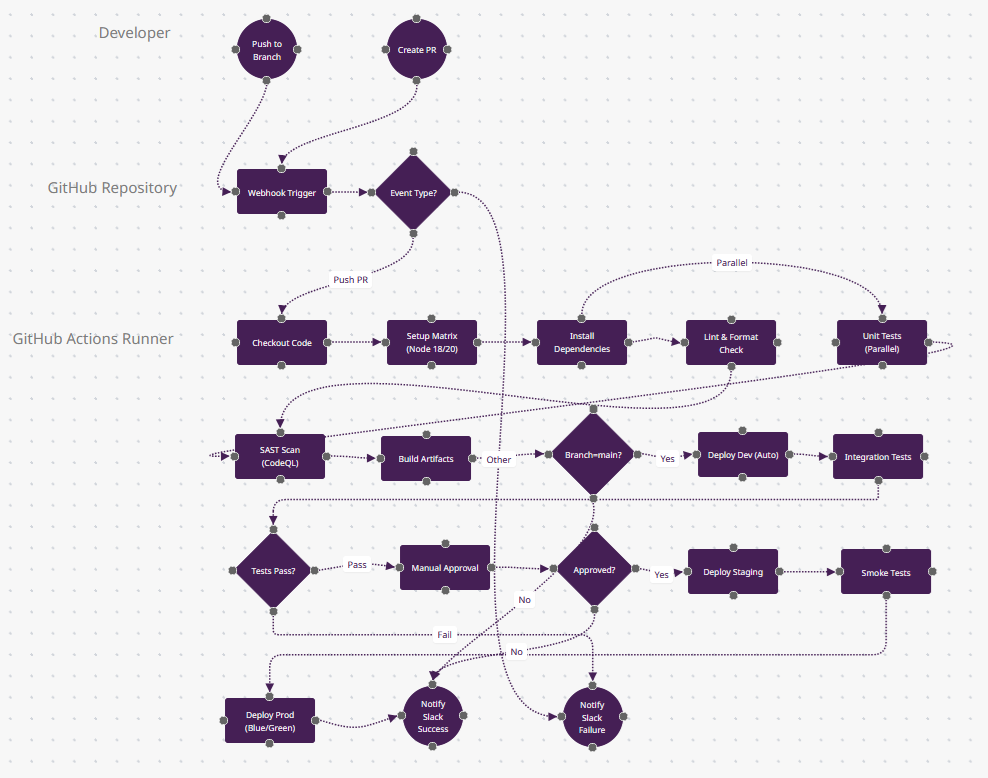
What Makes GitHub Actions Different
- Matrix Builds (n6): The "Setup Matrix" node represents GitHub Actions' killer feature—one YAML config spawns parallel jobs across Node 18/20/22 + Ubuntu/Windows/macOS simultaneously. This means n9 (Unit Tests) actually runs 6+ times in parallel. No other platform makes cross-platform testing this simple.
- Event-Driven Flexibility (n4): The "Event Type?" diamond handles 20+ trigger types (push, PR, schedule, workflow_dispatch, repository_dispatch). You can trigger workflows from GitHub Discussions comments or even external webhooks—architectural flexibility Jenkins requires plugins for.
- OIDC Authentication (invisible between n13→n18): Deployments use OpenID Connect federation—no AWS secret keys stored in GitHub Secrets. Your workflow gets temporary credentials directly from AWS STS. Only GitHub Actions and GitLab CI offer this natively in 2025.
- Reusable Workflows (not shown): In production, n10 (SAST Scan) would call a centralized .github/workflows/security.yml from another repo—DRY across 100+ projects. This "workflow as dependency" model is unique to GitHub.
- When to Choose: Your code lives on GitHub, you need zero-infrastructure CI, or you want 2,000 free minutes/month for public repos. Dominant in open-source (62% adoption per JetBrains 2025).
2. GitLab CI/CD: All-in-One DevSecOps
Context: GitLab CI/CD leads enterprise adoption (31.9% per Developer Nation) due to its integrated SCM+CI+CD+security in one platform. Pipelines defined in .gitlab-ci.yml use stages (build→test→deploy) with DAG support for complex dependencies. Ideal for teams requiring compliance (SOC2/HIPAA) with built-in container scanning, SAST/DAST, and license checks.
Why Developers Choose It: Auto DevOps templates for Kubernetes, review apps that spin up ephemeral environments per MR, and artifact passing between jobs without external storage. Multi-project pipelines trigger downstream repos.
Production Patterns: Dynamic child pipelines for monorepos, protected environments with deployment approvals, GitLab Pages for docs, and Kubernetes agent for secure cluster access.
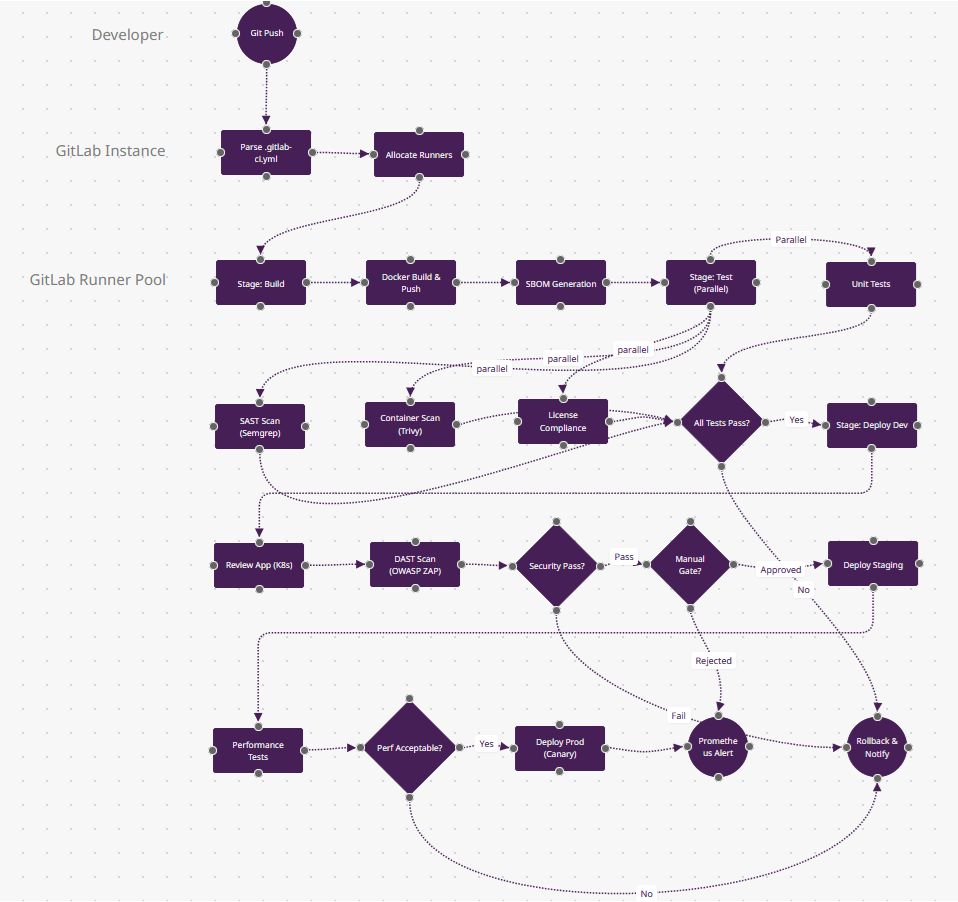
What Makes GitLab CI/CD Different
- All-in-One DevSecOps (n9-n11 parallel stage): Four security scans (SAST, container, DAST, license compliance) run in one stage with zero plugin installs. GitLab includes Semgrep, Trivy, and OWASP ZAP out-of-the-box—Jenkins would need 12 plugins for equivalent coverage.
- Review Apps (n14): This isn't just "deploy to dev"—GitLab spins up ephemeral Kubernetes environments per merge request with unique URLs (feature-branch-abc.review.example.com). Automatically destroyed on MR close. Heroku-style previews for any stack.
- DAG Pipelines (simplified here): In production, n8-n11 could have complex dependencies (
needs: [job-x, job-y]) instead of linear stages—run database migrations in parallel with frontend builds if they don't depend on each other. Only GitLab + Tekton support true DAG execution. - Container Registry + Kubernetes Agent (n5→n14): The Docker image built in n5 lives in GitLab's built-in registry (not DockerHub), and n14 deploys via GitLab's Kubernetes agent—pull-based like Argo CD, not push-based like most CI/CD. This eliminates cluster credential storage.
- When to Choose: You need compliance reporting (SOC2/HIPAA), want SCM+CI+CD+security in one platform, or manage multi-project monorepos. Leads enterprise adoption (31.9% per Developer Nation).
3. CircleCI: Speed-Optimized Cloud Pipelines
Context: CircleCI optimizes for build speed via intelligent caching, parallelism (split tests across 50 containers), and resource classes (CPU/RAM scaling). Config in .circleci/config.yml uses Orbs—reusable packages for AWS, Kubernetes, Slack—reducing boilerplate by 90%. Best for teams prioritizing sub-5-minute feedback loops on Docker/ARM workloads.
Why Developers Choose It: SSH debugging into failed builds, Docker layer caching (10x faster rebuilds), test splitting by timing data, and first-class support for Apple Silicon (M1/M2) runners.
Production Patterns: Workspace persistence for artifacts, scheduled workflows for nightly security scans, and approval jobs for staged rollouts. Insights dashboard tracks MTTR and flaky tests.
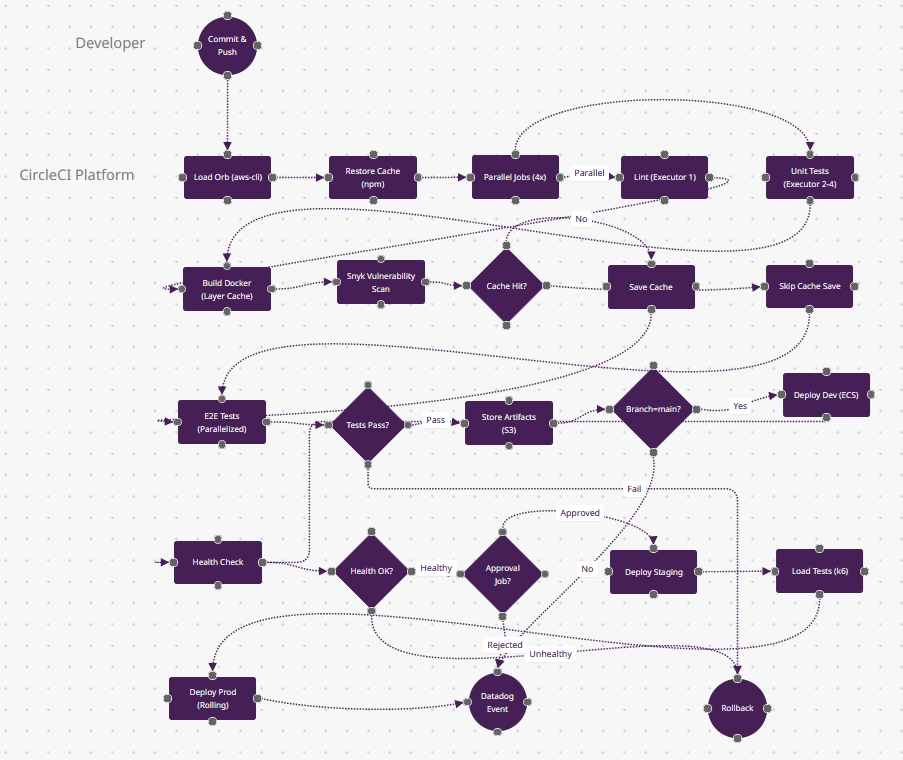
What Makes CircleCI Different
- Intelligent Caching (n9-n11): The "Cache Hit?" diamond uses timing data from past builds—if package-lock.json hasn't changed, n11 (Skip Cache Save) saves 2 minutes. But CircleCI also caches Docker layers (n7)—rebuilding a Dockerfile with unchanged base images takes seconds, not minutes.
- Test Splitting by Timing (n12): "E2E Tests (Parallelized)" splits your 500 Cypress tests across 50 containers based on historical timing data—slow tests get dedicated containers. You don't manually shard; CircleCI's API does it. This makes n12 finish in 1/50th the time.
- Resource Classes (invisible): Behind n5-n6 parallel jobs, you choose CPU/RAM (small/medium/large/GPU). Run linting on a small executor ($0.0006/min), Docker builds on xlarge (8 CPU, 16GB). Other tools give you "a runner"—CircleCI lets you optimize cost per job.
- SSH Debugging (not shown but critical): When n13 (Tests Pass?) fails, you can SSH directly into the failed container, ls the filesystem, and re-run commands. Jenkins requires VNC + plugins; CircleCI makes it one button click.
- When to Choose: Build speed is critical (sub-5-minute feedback loops), you're Docker-heavy, or you need Apple Silicon (M1/M2) runners for iOS builds. Dominates mobile app CI (Airbnb, Spotify scale).
4. Jenkins: Plugin-Rich Automation Server
Context: Jenkins holds 46% market share in enterprises due to 1,800+ plugins covering every tool (Jira, SonarQube, Kubernetes, Terraform). Pipelines in Jenkinsfile (Groovy DSL) offer declarative or scripted syntax. Self-hosted on-prem or cloud, it's the choice for regulated industries (finance/healthcare) requiring air-gapped builds.
Why Developers Choose It: Distributed builds across agent pools (Linux/Windows/macOS), Blue Ocean UI for visual pipeline editing, and scriptable post-actions (Slack on fail). Supports every SCM (Git, SVN, Perforce).
Production Patterns: Shared libraries for reusable Groovy functions, Jenkins Configuration as Code (JCasC) for reproducibility, and multibranch pipelines auto-discovering feature branches.
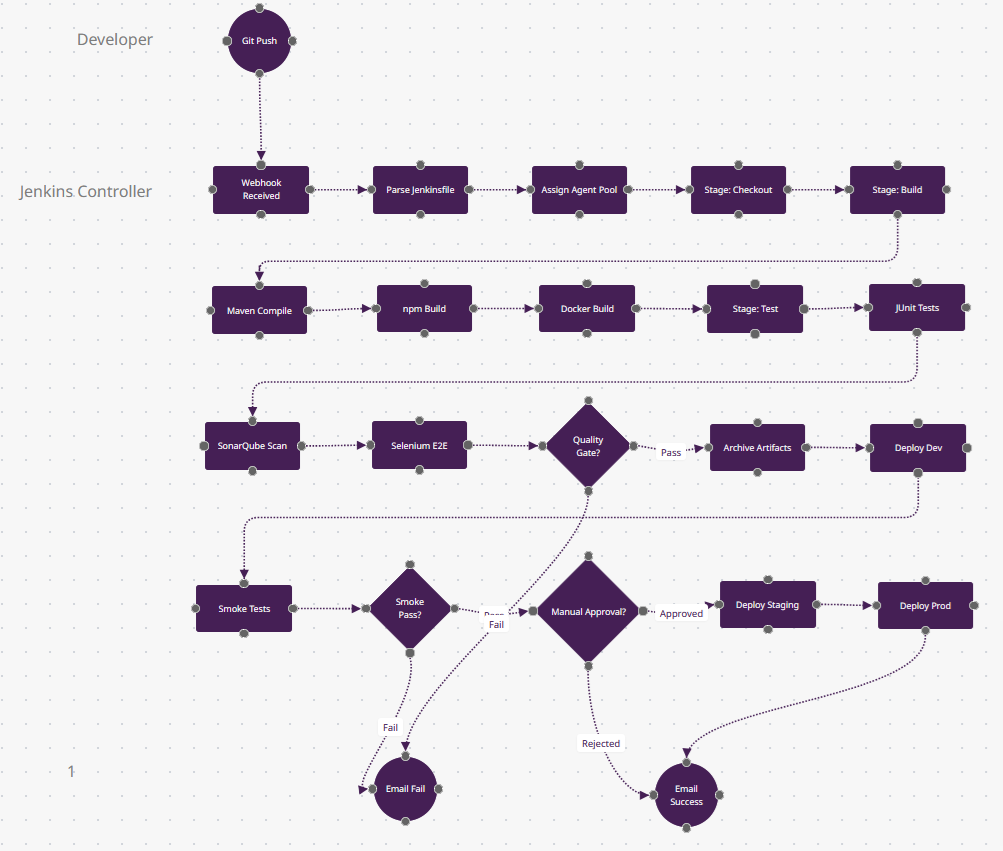
What Makes Jenkins Different
- Plugin Ecosystem (n10-n12 parallel tests): These three test nodes could integrate SonarQube (code quality), Selenium Grid (cross-browser), JUnit (Java), pytest (Python), and Jest (JS)—all via Jenkins' 1,800+ plugins. The n14 "Quality Gate?" diamond can enforce custom rules from any tool. No other platform has this plugin breadth.
- Distributed Builds (n3): "Assign Agent Pool" routes n6 (Maven) to a Linux agent, n7 (npm) to a Windows agent, and n8 (Docker) to a GPU agent—all in different data centers. Jenkins' controller-agent architecture scales to 1,000+ agents. GitHub Actions charges per minute; Jenkins uses your hardware.
- Groovy Scripting (invisible): The Jenkinsfile is Turing-complete code—n18 "Manual Approval?" could query a database, call an API, or parse Jira fields before deciding. CircleCI/GitLab use declarative YAML; Jenkins is imperative programming.
- Blue Ocean Visualization (post-run): After this pipeline finishes, Blue Ocean renders a visual flowchart of the execution path—which parallel jobs failed, how long each stage took. The n23 "Email Failure" includes an SVG of the failed path.
- When to Choose: You're in a regulated industry (finance/healthcare) needing on-prem/air-gapped builds, you have complex multi-branch workflows, or you need to integrate legacy tools (SVN, Perforce). Holds 46% enterprise market share for this reason.
5. Azure DevOps: Microsoft Ecosystem Integration
Context: Azure Pipelines dominates Microsoft shops (32% usage) with YAML or classic designer workflows. Multi-stage pipelines handle CI+CD in one config, with native integrations for Azure services (AKS, App Service, Key Vault). Use for .NET/C# projects or teams already on Azure/Microsoft 365.
Why Developers Choose It: Microsoft-hosted agents (Windows/Linux/macOS), service connections for AWS/GCP, test analytics via Azure Test Plans, and Boards integration linking commits to work items.
Production Patterns: Variable groups from Key Vault, deployment gates (query Azure Monitor before prod), artifact feeds for NuGet/npm packages, and YAML templates for DRY configs.
What Makes Azure DevOps Different
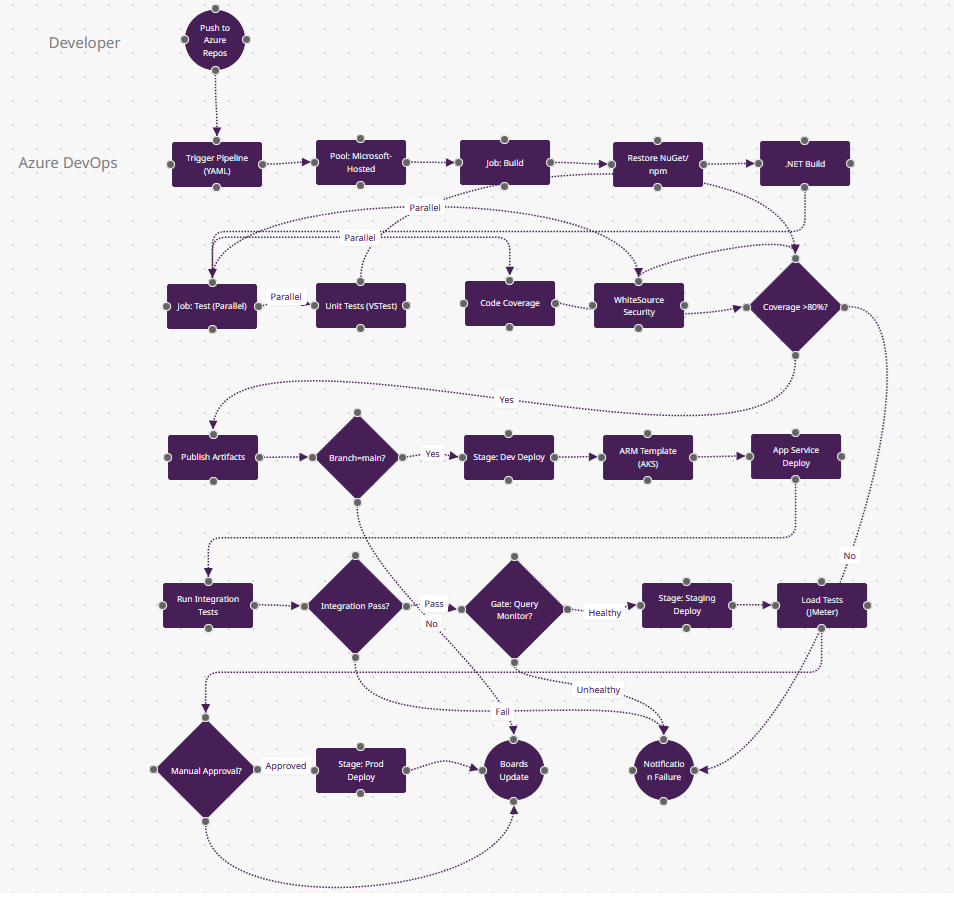
- Variable Groups from Key Vault (n11-n12): The "Coverage >80%?" gate uses a threshold stored in Azure Key Vault—rotate the value without editing YAML. Between n14-n23, connection strings and API keys are pulled from Key Vault per environment (dev/staging/prod). Native secret rotation other tools need Vault plugins for.
- Deployment Gates (n19): "Gate: Query Monitor?" pauses the pipeline and polls Azure Monitor for 15 minutes—if error rate <1%, proceed; else auto-abort. This isn't a manual approval; it's continuous verification querying Kusto logs. Only Azure DevOps and Harness have this built-in.
- Boards Integration (n24): "Boards Update" is a first-class action—this deployment automatically moves work item #4521 from "In Progress" to "Deployed to Prod" and tags it with build number. GitHub Actions requires webhooks; Azure DevOps uses a shared database.
- Multi-Stage YAML (structure here): One azure-pipelines.yml defines n4-n12 (CI), n13-n18 (dev deploy), n20-n21 (staging), n23 (prod)—with stage dependencies. Classic CI/CD separates build/release; Azure unifies them with deployment approvals in YAML.
- When to Choose: You're a Microsoft shop (.NET/C#/Azure), need Boards/Repos/Pipelines integration, or want Microsoft-hosted agents (Windows/Linux/macOS) without managing infrastructure. Dominates .NET ecosystem (32% usage).
6. Harness: AI-Powered Continuous Delivery
Context: Harness brings AI-driven verification and rollback to CD, analyzing logs/metrics (Datadog, New Relic) to auto-detect deployment failures. YAML pipelines support canary, blue-green, and rolling strategies with cost optimization (shut down dev at night). Ideal for SRE teams managing 100+ microservices.
Why Developers Choose It: Continuous Verification (AI compares metrics), automated rollback on anomaly detection, RBAC for compliance, and cloud cost dashboards. Service-based model abstracts Kubernetes complexity.
Production Patterns: Progressive delivery (canary 10%→50%→100%), approval policies (require 2 SREs), infrastructure provisioning via Terraform, and GitOps sync from config repos.
What Makes Harness Different
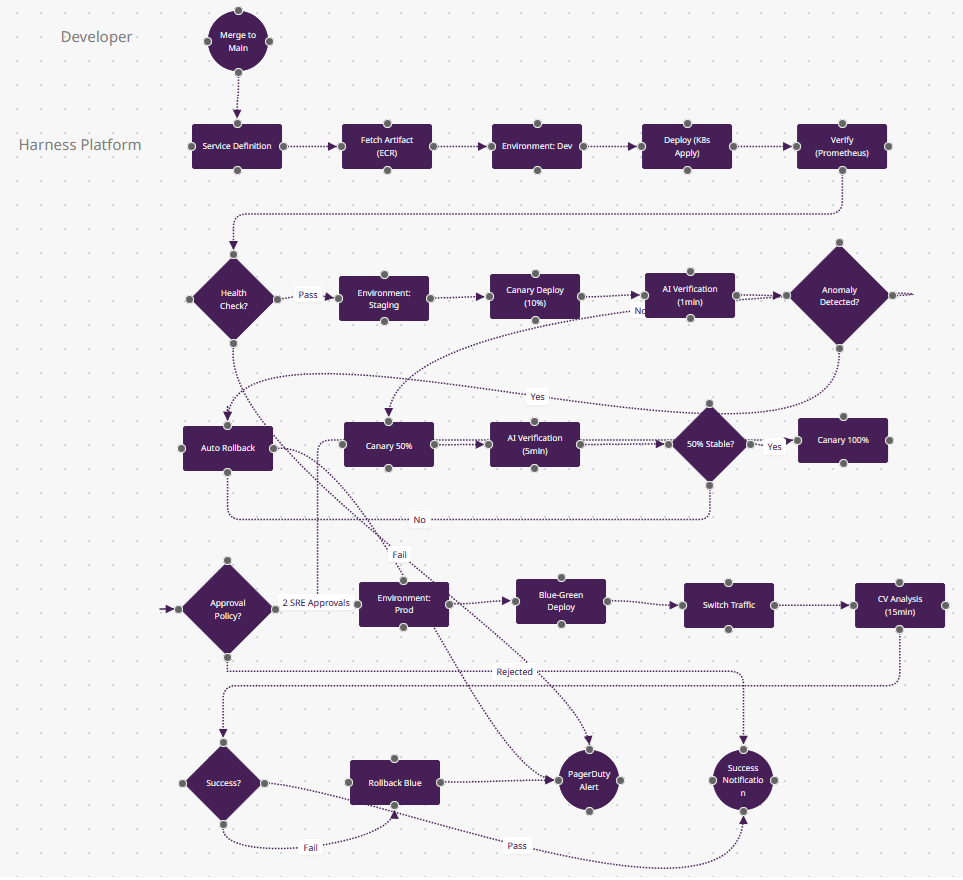
- AI Continuous Verification (n10-n11): The "AI Verification" nodes use machine learning—Harness queries Prometheus/Datadog for error rates, latency, throughput, then compares current canary metrics to the last 3 successful deploys. If n11 "Anomaly Detected?" sees a 5% error rate spike (when baseline is 0.1%), n12 auto-rollbacks. No human watches dashboards.
- Progressive Delivery Built-In (n9→n13→n15): This isn't just "deploy 10% then 50%"—Harness calculates traffic percentages, waits for metrics stabilization, and advances automatically. CircleCI/Jenkins need custom scripts; Harness's service model treats canary/blue-green as declarative config.
- Cost Optimization (invisible): Between n7-n8 (dev to staging), Harness can shut down dev at 6pm and restart at 8am—autoscaling based on business hours. The n20 "CV Analysis" dashboard shows deployment costs per service. This FinOps layer is unique to Harness/Octopus.
- Approval Policies as Code (n17): "Approval Policy?" enforces "2 SRE approvals required for prod on Fridays"—written in OPA (Open Policy Agent). Not a checkbox in UI; it's versioned policy-as-code that audits who approved what. Only Harness and Spinnaker do this.
- When to Choose: You manage 100+ microservices, need AI-driven rollback, want FinOps visibility, or require enterprise RBAC (SOC2/PCI compliance). SRE teams at scale (Salesforce, McAfee use Harness).
7. Bitbucket Pipelines: Atlassian-Native CI/CD
Context: Bitbucket Pipelines offers Docker-first CI/CD for Atlassian ecosystem teams (Jira/Confluence). Configured via bitbucket-pipelines.yml with Pipes—pre-built integrations for AWS, Slack, SonarCloud. Each step runs in a Docker container, ensuring consistent environments. Best for Jira-centric Agile workflows.
Why Developers Choose It: Branch-specific pipelines, Jira Smart Commits (auto-transition tickets), built-in Docker support, and deployments visible in Jira releases. Pipes eliminate bash scripting for common tasks.
Production Patterns: Custom Docker images for monorepo builds, parallel steps (lint+test), deployment variables per environment, and SSH keys from repository settings.
Download Bitbucket-Pipelines.fz
What Makes Bitbucket Pipelines Different
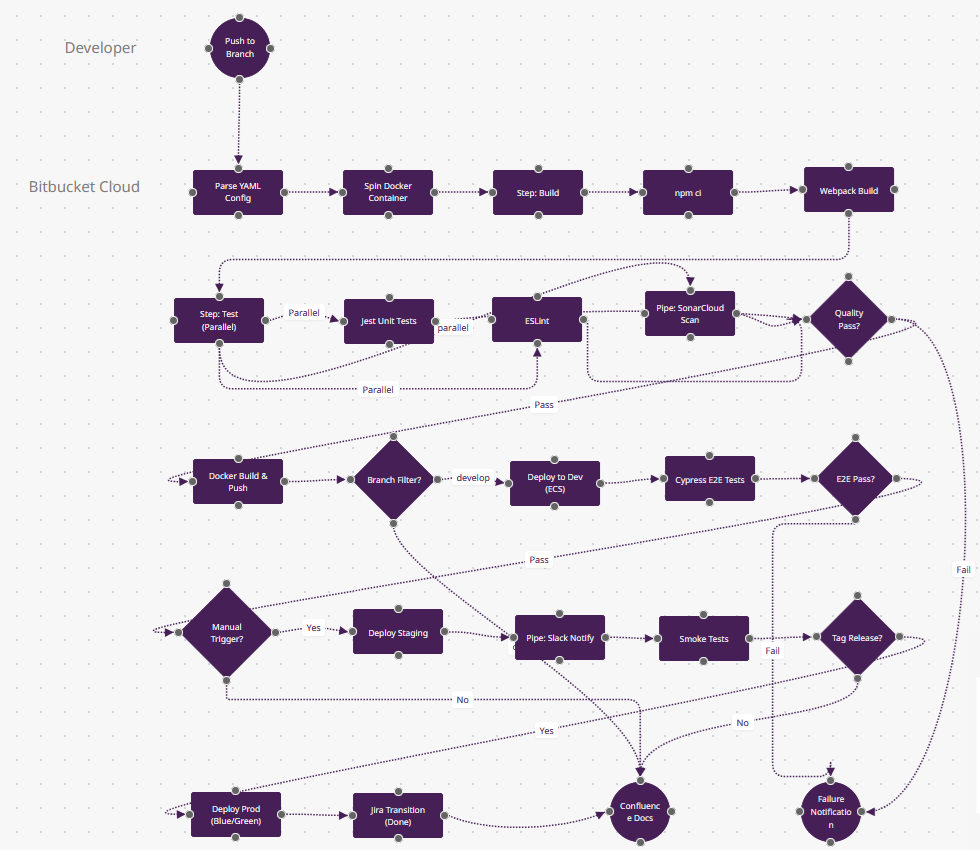
- Pipes Abstraction (n10, n19): "Pipe: SonarCloud Scan" and "Pipe: Slack Notify" are pre-built Docker containers from Atlassian's Pipe marketplace—one line of YAML replaces 50 lines of bash. Unlike Jenkins plugins (which run in controller), Pipes are sandboxed containers. CircleCI Orbs are similar but less curated.
- Jira Smart Commits (n23): "Jira Transition (Done)" happens because your commit message was
git commit -m "API-421 #done". Bitbucket parses this and transitions Jira ticket API-421 to "Done" column—no webhooks, just commit syntax. GitHub Actions requires Jira API calls. - Branch-Specific Pipelines (n13): The "Branch Filter?" diamond uses Bitbucket's branch model—develop runs n14 (dev deploy), release/* runs staging, main runs prod. This is YAML-configured but UI-visible in Bitbucket's deployment view—tracks which branch is in which environment.
- Docker-Native Steps (n3): Every step runs in a fresh Docker container (specified per step). n5 (npm ci) might use node:18-alpine, n11 (Docker Build) uses docker:latest. No "install Node, install Docker" scripts—each step is isolated.
- When to Choose: Your team lives in Jira/Confluence, you want zero-config Docker steps, or you manage 10-50 person Agile teams needing tight SCM-issue tracking integration. Dominates Atlassian-centric orgs.
8. TeamCity: Enterprise Build Management
Context: JetBrains' TeamCity excels at build chain orchestration—dependent builds trigger automatically (backend→frontend→Docker). Kotlin DSL configs enable type-safe pipelines in code. Enterprise features include flaky test detection, build failure analytics, and agent pool management. Popular in .NET/Java shops requiring audit trails.
Why Developers Choose It: Build cache reuse across branches (10x faster), parallel builds with smart dependency resolution, test history trends, and cloud agents (AWS/Azure) that scale on demand.
Production Patterns: Composite builds (lib→service→deploy), artifact dependencies (promote build #42 to prod), investigation auto-assignment (ML flags responsible commits), and VCS trigger rules.

What Makes TeamCity Different
- Build Chains with Dependencies (n4→n11→n16): In production, "Build Chain: API" (n4) finishing triggers "Build Chain: Frontend" (n11) automatically—snapshot dependencies mean "Frontend build #847 depends on API build #423." The n19 diamond "Snapshot Dependency?" decides if this chain was triggered or manual. Only TeamCity and Bamboo support this.
- Flaky Test Detection (n8-n9): The "Test Stability?" diamond uses ML—if LoginTest fails 3 times then passes, TeamCity marks it "flaky" and quarantines it (n10). Flaky tests don't block builds but get assigned to devs for fixing. CircleCI requires custom scripts; TeamCity's UI shows flake trends.
- Artifact Promotion (n18→n22): "Deploy to prod" doesn't rebuild—it promotes the exact Docker image from build #423 (built 3 days ago in dev). The n18 "Push to Registry" tags it v1.2.3, and n22 deploys that immutable artifact. Other tools rebuild from source; TeamCity ensures binary consistency.
- Kotlin DSL (invisible): The pipeline config is type-safe Kotlin code (not YAML)—your IDE autocompletes step names, catches typos at compile-time. n6-n8 parallel builds could be a forEach loop over a list. Only TeamCity and Bazel support compiled configs.
- When to Choose: You have complex multi-repo dependencies (.NET + Java + Node monorepo), need build artifact traceability, or want IntelliJ-level IDE support for pipeline code. Dominates enterprise Java/C# shops.
9. Argo CD: GitOps for Kubernetes
Context: Argo CD implements GitOps—Kubernetes manifests (YAML/Helm/Kustomize) in Git become the source of truth. Argo continuously syncs cluster state to match repo, with drift detection and auto-healing. Essential for platform teams managing 10+ clusters across dev/staging/prod. Declarative by design (no imperative scripts).
Why Developers Choose It: Cluster state visualization (live vs. desired), rollback via Git revert, multi-cluster support (promote app from cluster-dev to cluster-prod), and SSO integration (RBAC per namespace).
Production Patterns: App-of-apps pattern (Argo manages its own config), sync waves (deploy DB before app), health checks (CRD status), and pre/post-sync hooks (run migrations).

What Makes Argo CD Different
- Pull-Based GitOps (n3→n6 loop): The loop [sync every 3min] is Argo's architecture—it pulls from Git continuously, not waiting for webhooks. If GitHub is down, Argo still syncs from its cached repo. If someone
kubectl delete pod, n6 "Drift Detected?" notices within 3 minutes and n7 re-syncs. Push-based CI/CD (Jenkins, GitHub Actions) can't detect manual changes. - Declarative Sync Waves (n8-n11): These aren't sequential jobs—the wave numbers (0→1→2→3) tell Kubernetes "apply namespace first, then ConfigMap, then Deployment." If you add a new Secret (wave 1.5), Argo inserts it in order automatically. Helm hooks are similar but limited to install/upgrade; Argo supports any resource type with sync waves.
- Health Assessment Beyond Pods (n13-n14): The "Progressing?" diamond doesn't just check pod status—it reads Custom Resource statuses (e.g., Istio VirtualService health, Cert-Manager certificate issuance). n15 "Mark Healthy" only happens when all CRDs report healthy. Jenkins/CircleCI just check HTTP 200; Argo understands Kubernetes semantics.
- App-of-Apps Pattern (enabled by n7): The pre-sync hook can deploy Argo CD itself—you have an "infra" Argo app that manages 50 "service" Argo apps. Change one values.yaml in Git, and Argo recursively updates all 50 services. This meta-level GitOps is impossible in traditional CI/CD.
- When to Choose: You manage 10+ Kubernetes clusters, need audit trails for compliance (every change is a Git commit), want drift detection, or run multi-tenant platforms. The GitOps standard for platform engineering teams.
10. AWS CodePipeline: Native Cloud Automation
Context: AWS CodePipeline orchestrates CI/CD entirely within AWS, triggering on CodeCommit/GitHub/S3 changes. Stages use CodeBuild (Docker builds), CodeDeploy (EC2/ECS/Lambda), and manual approval actions. Ideal for AWS-only architectures requiring cross-account deployments or Step Functions integration.
Why Developers Choose It: IAM-based permissions, CloudWatch metrics for pipeline duration, S3 artifact encryption, and EventBridge integration (trigger on CloudFormation stack completion). Serverless-friendly (Lambda deploy in seconds).
Production Patterns: Multi-region deployments (us-east-1→eu-west-1), blue-green ECS deploys with ALB traffic shifting, CloudFormation stack updates, and SNS approval notifications.
What Makes AWS CodePipeline Different
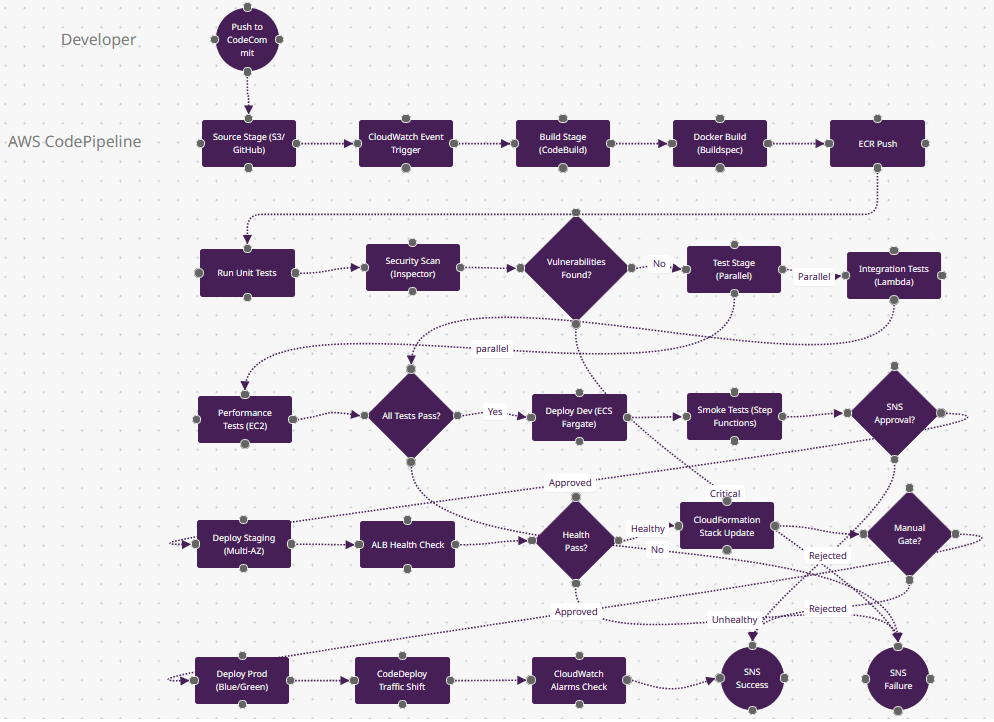
- Stage-Action Hierarchy (n2→n4→n9): CodePipeline structures as stages containing actions—n4 "Build Stage" contains n5-n8 actions (Docker build, tests, scans). In the UI, stages are horizontal boxes with actions as vertical steps. This visual model (vs. Jenkins' flat jobs) clarifies deployment gates.
- Cross-Account Deployments (simplified in n22): Production deployments use AssumeRole to deploy to a different AWS account (prod account 111, staging account 222). The n21 "Manual Gate?" enforces "only Deploy role in prod account can approve." Multi-account security is native; other tools need custom IAM scripts.
- EventBridge Integration (n3): "CloudWatch Event Trigger" can start pipelines on S3 object uploads, CloudFormation stack completions, or EC2 state changes—not just Git pushes. Example: Upload a Lambda ZIP to S3 → n3 triggers → n5 builds container → n22 deploys. Event-driven beyond SCM.
- CodeDeploy Traffic Shifting (n23): "CodeDeploy Traffic Shift" uses ALB/NLB weighted targets—shift 10% traffic to new ECS task, wait 5 minutes watching n24 "CloudWatch Alarms," then shift 50%. If alarms fire, auto-rollback. This blue-green orchestration is AWS-native; Kubernetes Ingress requires Flagger.
- When to Choose: You're AWS-only (no multi-cloud), need cross-account governance, want serverless Lambda deployments, or integrate with Step Functions for complex workflows. Tight coupling to AWS services is the tradeoff for simplicity.
Conclusion
These 10 workflows represent production-grade patterns used by engineering teams deploying code hundreds of times daily. Each platform's strengths align with specific organizational contexts—GitHub Actions for open-source velocity, GitLab for compliance-heavy DevSecOps, Jenkins for plugin ecosystems, and Argo CD for declarative Kubernetes GitOps. Copy the FlowZap Code into the playground at flowzap.xyz to visualize and customize these diagrams for your team's pipelines.
- JetBrains: The State of CI/CD
- DevOpsBay: DevOps Statistics and Adoption 2025
- Northflank: Best CI/CD Tools
- GitHub Actions vs GitLab CI vs Jenkins Comparison 2025
- Developer Nation Report DN29
- Aziro: Top CI/CD Service Providers
- Pieces: Best CI/CD Tools
- Spacelift: DevOps Statistics
- Spacelift: CI/CD Tools
- DeployHQ: Best CI/CD Software 2025
- Spacelift: Continuous Deployment Tools