

In 2026, over a dozen AI diagramming tools turn human text into mind maps (GitMind, MindMeister, Monica, MindMap AI, EdrawMind, Xmind AI). The directional flow is always identical: Human → Machine.
What is missing is the inverted flow: Machine → Human.
Today, we are announcing official Mind Map support in FlowZap, designed specifically to enable the AGMM (Agent-Generated Mind Map) pattern. Rather than using mind maps solely to help humans brainstorm, FlowZap allows autonomous agents to output their internal reasoning chains directly into clean, auditable mind maps.
The State of the Art: The Human → Machine Bottleneck
| Tool | Input | Output | Direction |
|---|---|---|---|
| GitMind | Text Prompt | Mind map | Human → Machine |
| MindMeister AI | Notes, Docs | Structured Map | Human → Machine |
| Monica | Summary Text | Mind map | Human → Machine |
| MindMap AI | Article / Subject | Mind map | Human → Machine |
| FlowZap Mind Maps | Reasoning Tokens / Thought Streams | Interactive Mind Map | Agent → Human |
Traditional mind mapping tools serve ideation. AGMM serves explainability.
You hear it everywhere today: AI agents are building and deciding at a speed humans simply can't keep up with — making it nearly impossible to understand how or why they reached a conclusion.
Reasoning models like DeepSeek-R1 produce raw <think> blocks. Claude Extended Thinking spends explicit token budgets across decision paths. OpenAI o-series models calculate internal reasoning efforts. However, when these agents execute complex enterprise tasks, reviewing thousands of lines of raw JSON or text thought logs creates a massive cognitive bottleneck for developers, architects, and compliance officers.
FlowZap's new Mind Map engine translates sequential thought tokens into radial, branching visual trees in real time.
The AGMM Pattern in Action: Production Incident Root Cause Analysis
To illustrate why AGMM matters to AI builders and IT architects, consider an autonomous Site Reliability Engineering (SRE) agent responding to an API latency surge in a microservices cluster.
Instead of outputting a wall of text log files, the agent emits FlowZap Mind Map DSL to visually communicate its diagnostic process:
mindmap { # Mindmap
  n1: circle label:"SRE Agent: API Latency Surge"
  n2: rectangle label:"Detection"
  n3: rectangle label:"Diagnosis"
  n4: rectangle label:"Mitigation"
  n5: rectangle label:"Scaling"
  n6: rectangle label:"Observability"
  n7: rectangle label:"Communication"
  n8: rectangle label:"Alert Rules"
  n9: rectangle label:"Anomaly Detection"
  n10: rectangle label:"Service Dependency"
  n11: rectangle label:"Log Analysis"
  n12: rectangle label:"Circuit Breaker"
  n13: rectangle label:"Throttling"
  n1.handle(top) -> n2.handle(bottom)
  n1.handle(right) -> n3.handle(left)
  n1.handle(bottom) -> n4.handle(top)
  n1.handle(left) -> n5.handle(right)
  n2.handle(right) -> n8.handle(left)
  n3.handle(top) -> n10.handle(bottom)
  n3.handle(top) -> n11.handle(bottom)
  n4.handle(right) -> n12.handle(bottom)
  n1.handle(top) -> n8.handle(bottom)
  n2.handle(top) -> n10.handle(top)
  n3.handle(left) -> n1.handle(right)
  n3.handle(bottom) -> n12.handle(top)
  n3.handle(right) -> n13.handle(left)
  n13.handle(bottom) -> n4.handle(right)
  n6.handle(right) -> n1.handle(left)
  n7.handle(top) -> n1.handle(bottom)
  n11.handle(left) -> n2.handle(bottom)
  n9.handle(top) -> n2.handle(left)
}
Which leads to this representation in FlowZap Mind Maps:
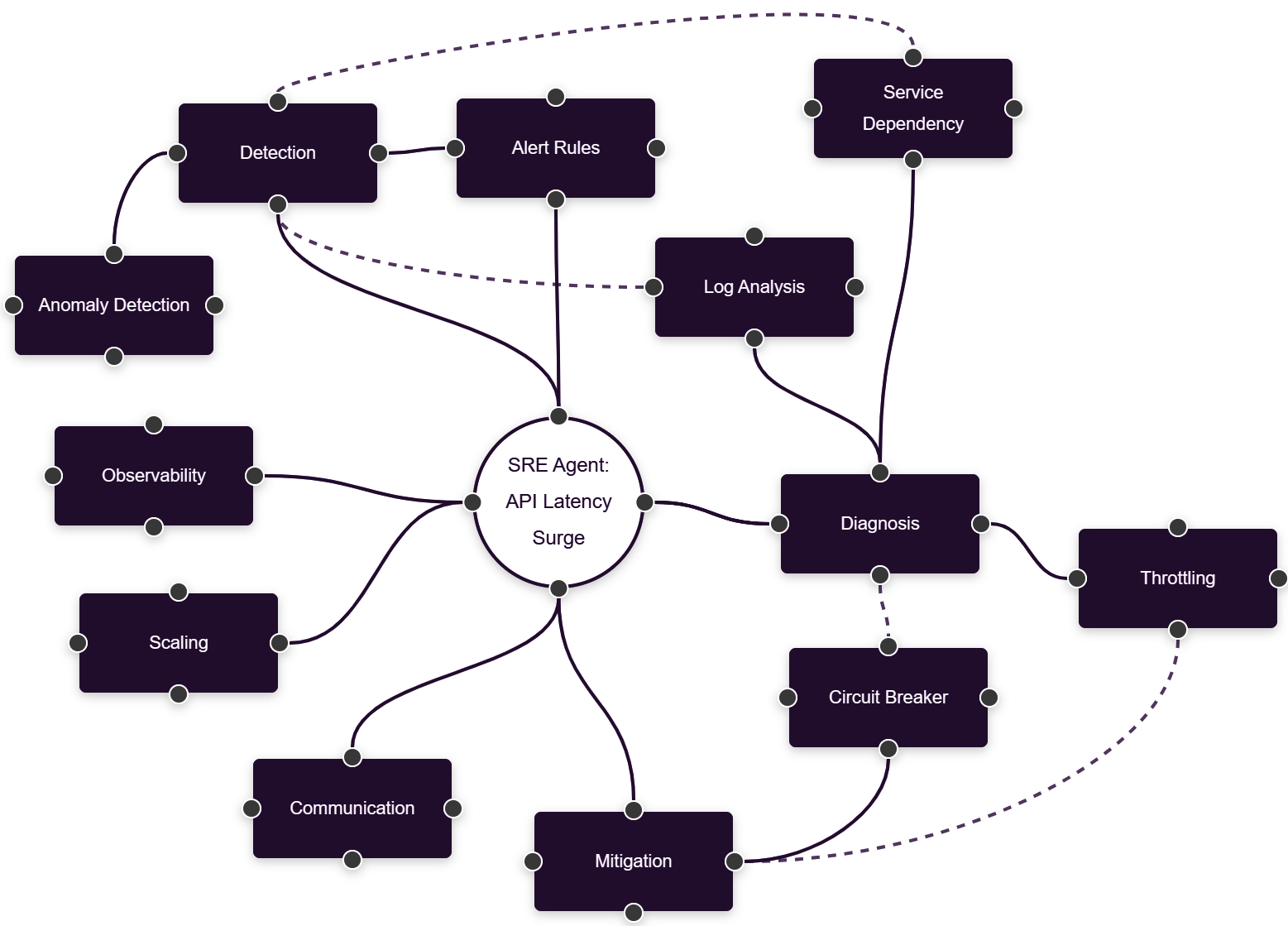
In under 5 seconds, an architect reviewing this map can verify:
- What the agent investigated (Database, Auth, Redis).
- Where the agent spent its cognitive budget (50% focused on Redis).
- Why alternative paths were rejected (Database queries were fast, Auth latencies were normal).
- The proposed mitigation (Key partitioning on
user_session_v2).
When Should AI Builders & IT Architects Use FlowZap Mind Maps?
As an AI architect or consultant building agentic systems, you should integrate FlowZap Mind Maps at four specific architectural trigger points:
1. Human-in-the-Loop (HITL) Validation Gates
When an agent reaches a high-risk decision boundary (such as executing a database migration, issuing a loan denial, or changing network firewall rules), do not present the human supervisor with raw log traces. Render a FlowZap Mind Map showing the rejected alternatives and the winning hypothesis. The human operator can validate or reject the reasoning branch in seconds.
2. Post-Mortem & Audit Trail Logging
In regulated domains (such as FINRA/SEC compliance, OSFI B-13 in banking, or HIPAA healthcare workflows), post-hoc text generation can be accused of hallucination or rationalization. Storing the agent's exact execution mind map provides a deterministic, visual audit record of what factors were weighed at execution time.
3. Debugging Recursive Agent Loops & Hallucinations
When building multi-step agents using frameworks like LangGraph, AutoGen, or CrewAI, agents can enter circular reasoning loops. A visual mind map immediately exposes dead-end loops (e.g., Node A repeatedly branching into Node B) that are difficult to spot in standard CLI outputs.
4. Client & Stakeholder Architecture Reporting
Consultants and enterprise architects delivering AI solutions often struggle to explain agent behavior to C-level executives. FlowZap Mind Maps provide a clean, executive-ready asset that demonstrates how autonomous workflows handle edge cases and safety constraints.
How FlowZap's Mind Mapping DSL Works
FlowZap's text-to-diagram syntax treats mind maps as radial text structures. You do not need to drag boxes, configure manual coordinates, or manage canvas alignment.
Key Features of FlowZap Mind Maps:
- Text-Native DSL: Generates clean diagrams via API, Python scripts, or LLM function calls.
- Automated Radial Layout: Nodes automatically position themselves around central concepts with clean connection handles.
- Lightweight Export: Render interactive web views, PNGs, or SVGs instantly inside your agent pipelines.
Start Building Transparant Agents Today
Mind mapping is no longer just for human brainstorming — it is the missing visual UI for agentic reasoning.