
What we mean by “memory”
Most AI agents do not fail because the model is dumb; they fail because the system forgets what matters. A context window is just short-term working memory. Close the tab, switch channels, or hit the token limit, and your “memory” vanishes.
If you are hacking on OpenClaw, ZeroClaw, NanoClaw, or your own claw-style runtime, this post is about the boring-but-critical layer: how your agent actually remembers things.
Here “memory” means system-level structures that store and retrieve information across turns, tasks, and sessions—not “I cranked the max tokens to 16k.” OpenClaw’s own docs describe a three-tier design: short-term context (conversation history), long-term semantic storage (for example memorySearch or a knowledge vault), and episodic event logs.
The 7 patterns below map nicely to that model:
- Session memory – short-term working state
- Rolling summary – compressed history
- Profile memory – SOUL / USER style identity and preferences
- Semantic memory –
memorySearch, knowledge vault, RAG stores - Episodic memory – runs, event logs, episodes
- Hybrid retrieval – mixing vector, keyword, and recency
- Shared memory – one state layer for many agents or channels
Pattern 1 – Session memory (short-term context)
Session memory is the whiteboard for the current conversation: the active turn history your agent carries between messages. In OpenClaw, this is literally the conversation history buffer, which includes user messages, agent replies, and skill results for the current chat.
How it works
- Channel sends the new message plus recent history.
- Agent runtime merges that with any local session state.
- Prompt is assembled and sent to the LLM.
- Response is stored back into the same history.
Performance & UX impact
- Performance: Cheap to start with, but cost and latency grow with history length and context window size.
- UX: Short-term continuity feels great until history gets silently truncated and the agent forgets mid-project.
OpenClaw mapping
- Out-of-the-box: Yes. OpenClaw keeps per-session conversation history and sends it to the model up to the context limit.
- Where: Conversation logs and in-memory session state maintained across messages.
FlowZap Code – Session memory
User { # User
n1: circle label="User sends message"
n2: rectangle label="See agent reply"

n1.handle(right) -> Agent.n3.handle(left)
Agent.n8.handle(right) -> n2.handle(left)
}

Agent { # Agent
n3: rectangle label="Receive message"
n4: rectangle label="Load session history"
n5: rectangle label="Assemble prompt"
n6: rectangle label="Call LLM"
n7: rectangle label="Receive LLM reply"
n8: rectangle label="Return answer to user"
n9: rectangle label="Persist updated session"

n3.handle(right) -> n4.handle(left)
n4.handle(right) -> n5.handle(left)
n5.handle(right) -> n6.handle(left)
n6.handle(right) -> LLM.n10.handle(left)
n7.handle(right) -> n8.handle(left)
n8.handle(bottom) -> n9.handle(top) [label="Save session"]
}

Memory { # Session Store
n11: rectangle label="Read session state"
n12: rectangle label="Write session state"

n3.handle(bottom) -> n11.handle(top) [label="Get history"]
n11.handle(right) -> Agent.n4.handle(left)
Agent.n9.handle(bottom) -> n12.handle(top) [label="Store history"]
}

LLM { # LLM
n10: rectangle label="Generate answer"

n10.handle(right) -> Agent.n7.handle(left)
}
Pattern 2 – Rolling summary memory (compressed history)
Rolling summary memory is your meeting-notes pattern: instead of hauling the entire transcript, you periodically summarize recent turns into a compact state and carry that forward. OpenClaw exposes a similar idea via Memory Flush, where important context is written out before long sessions are compacted.
How it works
- Keep full history for a while.
- When a threshold is hit, summarize the last chunk.
- Replace detailed turns with a shorter summary message in the prompt.
Performance & UX impact
- Performance: Dramatically reduces prompt size on long-running chats, keeping token count and latency under control.
- UX: The user feels that the agent remembers the gist while avoiding hard truncation, but line-by-line detail is lost.
OpenClaw mapping
- Out-of-the-box: Partially. Memory Flush and compression mechanisms embody this pattern.
- Where:
MEMORY.md,memory/style files, and any summarizer you run before context is compacted.
FlowZap Code – Rolling summary
User { # User
n1: circle label="New message"
n2: rectangle label="See reply"

n1.handle(right) -> Agent.n3.handle(left)
Agent.n12.handle(right) -> n2.handle(left)
}

Agent { # Agent
n3: rectangle label="Append turn to history"
n4: diamond label="Summary threshold reached?"
n5: rectangle label="Request latest summary"
n6: rectangle label="Build compact prompt"
n7: rectangle label="Call LLM"
n12: rectangle label="Return answer"

n3.handle(right) -> n4.handle(left)
n4.handle(right) -> Summarizer.n8.handle(left) [label="Yes"]
n4.handle(bottom) -> n5.handle(top) [label="No"]
n5.handle(bottom) -> SummaryStore.n10.handle(top) [label="Load summary"]
n6.handle(right) -> n7.handle(left)
n7.handle(right) -> LLM.n13.handle(left)
}

Summarizer { # Summarizer
n8: rectangle label="Summarize recent turns"
n9: rectangle label="Store summary snapshot"

n8.handle(right) -> n9.handle(left)
n9.handle(bottom) -> SummaryStore.n11.handle(top) [label="Save summary"]
}

SummaryStore { # Summary Store
n10: rectangle label="Read latest summary"
n11: rectangle label="Write summary"

n10.handle(right) -> Agent.n6.handle(left)
}

LLM { # LLM
n13: rectangle label="Generate answer"

n13.handle(right) -> Agent.n12.handle(left)
}
Pattern 3 – Profile memory (SOUL / USER style identity)
Profile memory is the this-is-who-I-am layer: stable facts about the user and agent, like name, timezone, tools, preferences, and constraints. In OpenClaw this maps almost 1:1 to SOUL.md, USER.md, and curated long-term memory such as MEMORY.md.
How it works
- When a session starts, the runtime loads profile data.
- Each prompt combines system persona, user profile, and the current message.
- Important new facts can be written back into profile memory.
Performance & UX impact
- Performance: Small, predictable overhead per request.
- UX: Big lift in perceived intelligence because the agent remembers your name, stack, tone, and recurring constraints.
OpenClaw mapping
- Out-of-the-box: Yes.
SOUL.mddefines personality,USER.mdstores user-specific info, andMEMORY.mdpersists curated long-term details. - Where: Markdown memory files kept alongside the agent config.
FlowZap Code – Profile memory
User { # User
n1: circle label="Start session"
n2: rectangle label="Send request"
n3: rectangle label="See personalized reply"

n1.handle(right) -> n2.handle(left)
n2.handle(right) -> Agent.n4.handle(left)
Agent.n9.handle(right) -> n3.handle(left)
}

Agent { # Agent
n4: rectangle label="Identify user"
n5: rectangle label="Load profile"
n6: rectangle label="Build prompt with profile"
n7: rectangle label="Call LLM"
n8: rectangle label="Optionally update profile"
n9: rectangle label="Return answer"

n4.handle(right) -> n5.handle(left)
n5.handle(right) -> n6.handle(left)
n6.handle(right) -> n7.handle(left)
n7.handle(right) -> LLM.n10.handle(left)
n8.handle(right) -> ProfileStore.n11.handle(left) [label="Write profile"]
}

ProfileStore { # Profile Store
n11: rectangle label="Read/Write profile"

Agent.n5.handle(bottom) -> n11.handle(top) [label="Read profile"]
n11.handle(right) -> Agent.n5.handle(left)
}

LLM { # LLM
n10: rectangle label="Generate answer using profile"

n10.handle(right) -> Agent.n9.handle(left)
}
Pattern 4 – Semantic memory (vector / memorySearch / vault)
Semantic memory is your long-term knowledge base: facts, notes, docs, and conversations embedded into a vector index and retrieved by similarity. In OpenClaw this is exactly what memorySearch and skills like knowledge-vault do.
How it works
- Text is chunked, embedded, and stored in a vector database.
- On a query, you embed the question, run a vector search, rerank candidates, then inject top results into the prompt.
Performance & UX impact
- Performance: Extra IO and token cost per query.
- UX: Done right, this is where the agent feels like it remembers everything without hallucinating as much.
OpenClaw mapping
- Out-of-the-box: Yes, when you enable
memorySearchor similar skills. - Where: SQLite+vec or external vector backends, depending on your setup.
FlowZap Code – Semantic memory
User { # User
n1: circle label="Ask question"
n2: rectangle label="See answer with references"

n1.handle(right) -> Agent.n3.handle(left)
Agent.n12.handle(right) -> n2.handle(left)
}

Agent { # Agent
n3: rectangle label="Receive query"
n4: rectangle label="Build memory search query"
n5: rectangle label="Send to retriever"
n6: rectangle label="Inject recalled memories"
n7: rectangle label="Assemble final prompt"
n8: rectangle label="Call LLM"
n12: rectangle label="Return answer"

n3.handle(right) -> n4.handle(left)
n4.handle(right) -> n5.handle(left)
n5.handle(bottom) -> Retriever.n9.handle(top) [label="Semantic query"]
n6.handle(right) -> n7.handle(left)
n7.handle(right) -> n8.handle(left)
n8.handle(right) -> LLM.n13.handle(left)
}

Retriever { # Memory Retriever
n9: rectangle label="Embed query"
n10: rectangle label="Search vector store"
n11: rectangle label="Rerank top memories"

n9.handle(right) -> n10.handle(left)
n10.handle(right) -> n11.handle(left)
n11.handle(top) -> Agent.n6.handle(bottom) [label="Top memories"]
}

VectorDB { # Vector Store
n13: rectangle label="Vector index"

Retriever.n10.handle(bottom) -> n13.handle(top) [label="Similarity search"]
}

LLM { # LLM
n14: rectangle label="Answer using recalled facts"

n14.handle(right) -> Agent.n12.handle(left)
}
Pattern 5 – Episodic memory (runs / event logs)
Episodic memory is your agent’s experience log: each episode is a past run with its context, plan, tools, and outcome. OpenClaw already emits rich logs and spans like openclaw.run.attempt, session.state, and model.usage that can be turned into this pattern.
How it works
- Every task run becomes an episode with input, actions, and outcome.
- Before tackling a new task, the agent fetches similar episodes and uses them as hints.
Performance & UX impact
- Performance: Extra storage and indexing, plus a lookup per task.
- UX: Over time, the agent feels like it is learning from experience instead of repeating the same failed plan.
OpenClaw mapping
- Out-of-the-box: The raw signals are already there in logs, spans, and metrics.
- Where: Run histories and telemetry indexed for later recall.
FlowZap Code – Episodic memory
User { # User
n1: circle label="1. Submit task"
n2: rectangle label="12. See result"

n1.handle(right) -> Agent.n3.handle(left)
Agent.n9.handle(right) -> n2.handle(left)
}

Agent { # Agent
n3: rectangle label="1. Receive task"
n4: rectangle label="2. Search similar episodes"
n5: rectangle label="4. Past lessons"
n6: rectangle label="5. Execute plan"
n7: rectangle label="6. Capture outcome"
n8: rectangle label="7. Send episode for scoring"
n9: rectangle label="11. Return result"

n3.handle(right) -> n4.handle(left)
n5.handle(right) -> n6.handle(left)
n6.handle(right) -> n7.handle(left)
n7.handle(right) -> n8.handle(left)
n8.handle(right) -> Evaluator.n13.handle(left) [label="8. Outcome"]
EpisodeStore.n12.handle(right) -> n9.handle(left) [label="11.b Outcome"]
}

EpisodeStore { # Episode Store
n10: rectangle label="3. Episode search"
n11: rectangle label="3.2 Search similar episodes"
n12: rectangle label="10. Episode + lesson"

Agent.n4.handle(right) -> n10.handle(left) [label="2. Search similar episodes"]
n10.handle(right) -> n11.handle(left) [label="3. Episode search"]
n11.handle(right) -> Agent.n5.handle(left) [label="4. Past lessons"]
Evaluator.n14.handle(right) -> n12.handle(left) [label="10. Episode + lesson"]
}

Evaluator { # Evaluator
n13: rectangle label="9. Score outcome"
n14: rectangle label="9. Extract lesson"

n13.handle(right) -> n14.handle(left)
}
Pattern 6 – Hybrid retrieval memory (semantic + keyword + recency)
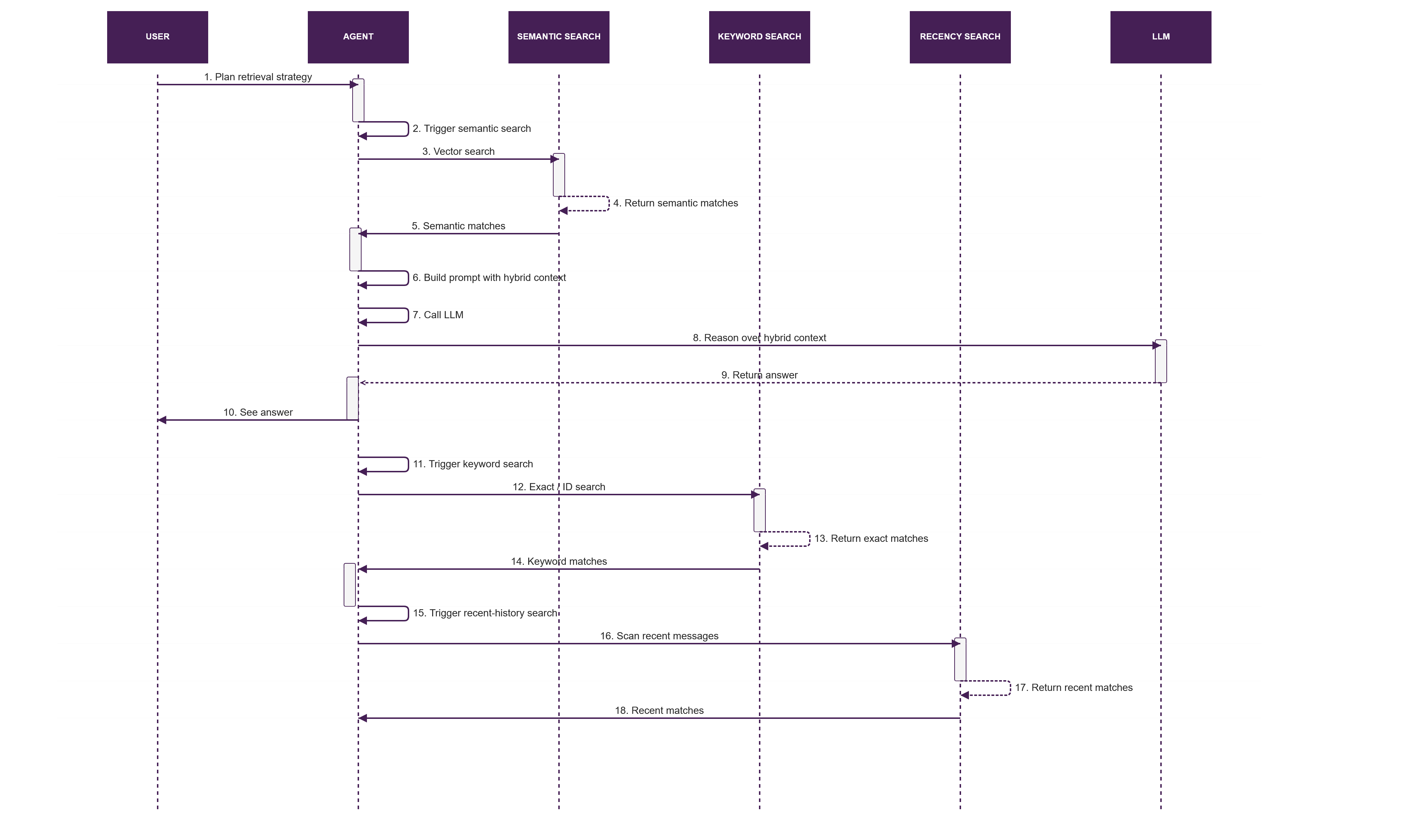
Hybrid retrieval is the stop-fighting-do-all-three pattern: combine vector search, keyword or ID lookup, and recency search before building the context bundle. This mirrors how OpenClaw can mix semantic retrieval, direct file lookups, and plain conversation history in one prompt.
In practice, this is often the most robust production pattern because each retrieval method covers a different failure mode. Semantic search catches fuzzy intent, keyword lookup catches exact identifiers, and recency search catches the thing the user mentioned two minutes ago.
How it works
- Planner decides which retrieval modes to use.
- Run semantic search, exact or keyword search, and recency search in parallel.
- Merge and rerank results into a single ranked context set.
Performance & UX impact
- Performance: More retrieval calls mean more latency, so timeouts and caps matter.
- UX: Much higher recall because the agent can find both fuzzy references and exact entities.
OpenClaw mapping
- Out-of-the-box: Supported conceptually:
memorySearch, filesystem skills, and recent conversation can all be pulled into the same context. - Where: Your routing layer, middleware, or skill graph.
FlowZap Code – Hybrid retrieval
User { # User
n1: circle label="Ask mixed query"
n2: rectangle label="See answer"

n1.handle(right) -> Agent.n3.handle(left)
Agent.n18.handle(right) -> n2.handle(left)
}

Agent { # Agent
n3: rectangle label="Plan retrieval strategy"
n4: rectangle label="Trigger semantic search"
n5: rectangle label="Trigger keyword search"
n6: rectangle label="Trigger recent-history search"
n7: rectangle label="Merge and rerank"
n8: rectangle label="Build prompt with hybrid context"
n9: rectangle label="Call LLM"
n18: rectangle label="Return answer"

n3.handle(bottom) -> n4.handle(top) [label="Semantic"]
n3.handle(right) -> n5.handle(left) [label="Keyword"]
n3.handle(left) -> n6.handle(right) [label="Recent"]
n7.handle(right) -> n8.handle(left)
n8.handle(right) -> n9.handle(left)
n9.handle(right) -> LLM.n19.handle(left)
}

Semantic { # Semantic Search
n10: rectangle label="Vector search"
n11: rectangle label="Return semantic matches"

Agent.n4.handle(right) -> n10.handle(left)
n10.handle(right) -> n11.handle(left)
n11.handle(bottom) -> Agent.n7.handle(top) [label="Semantic"]
}

Keyword { # Keyword Search
n12: rectangle label="Exact/ID search"
n13: rectangle label="Return exact matches"

Agent.n5.handle(right) -> n12.handle(left)
n12.handle(right) -> n13.handle(left)
n13.handle(bottom) -> Agent.n7.handle(top) [label="Keyword"]
}

Recent { # Recency Search
n14: rectangle label="Scan recent messages"
n15: rectangle label="Return recent matches"

Agent.n6.handle(right) -> n14.handle(left)
n14.handle(right) -> n15.handle(left)
n15.handle(bottom) -> Agent.n7.handle(top) [label="Recent"]
}

LLM { # LLM
n19: rectangle label="Reason over hybrid context"

n19.handle(right) -> Agent.n18.handle(left)
}
Pattern 7 – Shared memory (multi-agent / multi-channel)
Shared memory is the central brain for multi-agent or multi-channel systems: planner, researcher, and operator agents all read and write to one state layer instead of hauling massive prompts around. In the claw world, this looks like a shared memory folder or database that both your main OpenClaw instance and sidecar agents use.
How it works
- Orchestrator breaks work into subtasks.
- Specialist agents pull from and push to a shared state store.
- Orchestrator composes the final answer from that shared state.
Performance & UX impact
- Performance: Fewer giant prompts, more small reads and writes to a central store.
- UX: Multi-agent setups feel coherent instead of each assistant having its own inconsistent memory.
OpenClaw mapping
- Out-of-the-box: OpenClaw gives you a single memory tree that already acts as shared state across channels and sessions.
- Where: The same memory folder and DB backing multiple inbound channels and possibly additional agents.
FlowZap Code – Shared memory
Orchestrator { # Orchestrator
n1: circle label="Complex task arrives"
n2: rectangle label="Request shared context"
n3: rectangle label="Create research subtask"
n4: rectangle label="Create action subtask"
n5: rectangle label="Receive findings and results"
n6: rectangle label="Compile final answer"

n1.handle(right) -> n2.handle(left)
n2.handle(bottom) -> SharedMemory.n7.handle(top) [label="Read state"]
n3.handle(right) -> n4.handle(left)
n3.handle(bottom) -> Researcher.n9.handle(top) [label="Research task"]
n4.handle(bottom) -> Operator.n13.handle(top) [label="Action task"]
n5.handle(right) -> n6.handle(left)
Researcher.n12.handle(top) -> n5.handle(left) [label="Finding"]
Operator.n17.handle(top) -> n5.handle(right) [label="Result"]
}

Researcher { # Research agent
n9: rectangle label="Receive research task"
n10: rectangle label="Read shared memory"
n11: rectangle label="Analyze with context"
n12: rectangle label="Return finding"

n9.handle(right) -> n10.handle(left)
n10.handle(right) -> n11.handle(left)
n11.handle(right) -> n12.handle(left)
n10.handle(bottom) -> SharedMemory.n7.handle(left) [label="Read state"]
}

Operator { # Operator agent
n13: rectangle label="Receive action task"
n14: rectangle label="Read shared memory"
n15: rectangle label="Execute with context"
n16: rectangle label="Write result to memory"
n17: rectangle label="Return result"

n13.handle(right) -> n14.handle(left)
n14.handle(right) -> n15.handle(left)
n15.handle(right) -> n16.handle(left)
n16.handle(bottom) -> SharedMemory.n8.handle(left) [label="Write state"]
n15.handle(bottom) -> n17.handle(top)
}

SharedMemory { # Shared memory broker
n7: rectangle label="Resolve memory request"
n8: rectangle label="Update shared state"

n7.handle(right) -> n8.handle(left)
}
How this plugs into OpenClaw out-of-the-box
If you are using OpenClaw today, you already have most of these patterns, at least partially.
- Session memory: Conversation history and session state by default.
- Rolling summary: Memory Flush and compression before trimming context.
- Profile memory:
SOUL.md,USER.md, curatedMEMORY.md. - Semantic memory:
memorySearch, knowledge-vault skill, or a vector backend. - Episodic memory: Logs, spans, and run histories that can be indexed as episodes.
- Hybrid retrieval: Combining semantic search with raw files and recent history in your prompt builder.
- Shared memory: A single local memory tree shared across channels and additional agents.
So the real move for OpenClaw, ZeroClaw, and NanoClaw builders is not “add yet another database,” it is naming which memory pattern you are using where and drawing it so you and your future self can reason about it.
Inspirations
- https://www.lindy.ai/blog/ai-agent-architecture
- https://blogs.oracle.com/developers/agent-memory-why-your-ai-has-amnesia-and-how-to-fix-it
- https://kenhuangus.substack.com/p/the-openclaw-design-patternspart
- https://milvus.io/blog/openclaw-formerly-clawdbot-moltbot-explained-a-complete-guide-to-the-autonomous-ai-agent.md
- https://zackbot.ai/blog/the-2026-ai-agent-landscape-openclaw-its-alternatives-and-what-actually-works/
- https://openclawroadmap.com/config-memory.php
- https://openclawlaunch.com/guides/openclaw-memory
- https://www.youtube.com/watch?v=xNXvYrVfsNk
- https://redis.io/blog/ai-agent-architecture/
- https://dev.to/czmilo/2026-complete-guide-to-openclaw-memorysearch-supercharge-your-ai-assistant-49oc
- https://docs.openclaw.ai/concepts/memory
- https://docs.openclaw.ai/concepts/messages
- https://open-claw.bot/docs/help/development/logging/
- https://www.reddit.com/r/openclaw/comments/1r0uqwe/wth_openclaw_lost_the_entire_chat_history/
- https://dataa.dev/2025/09/01/agent-memory-patterns-building-persistent-context-for-ai-agents/
- https://milvus.io/blog/we-extracted-openclaws-memory-system-and-opensourced-it-memsearch.md
- https://playbooks.com/skills/openclaw/skills/knowledge-vault
- https://www.tencentcloud.com/techpedia/140855
- https://clawdbot.works
- https://flowzap.xyz/blog/flowzaps-game-changing-update-one-code-two-views/
- https://slashdot.org/software/comparison/NanoClaw-vs-ZeroClaw/
- https://lumadock.com/tutorials/openclaw-memory-explained
- https://www.youtube.com/watch?v=vte-fDoZczE
- https://www.reddit.com/r/openclaw/comments/1raznt8/trying_to_get_openclaw_help_me_build_a_large/